Encounter error 'You do not have access right to Frontier-Ehr (status is disable)' during login
Possible cause :
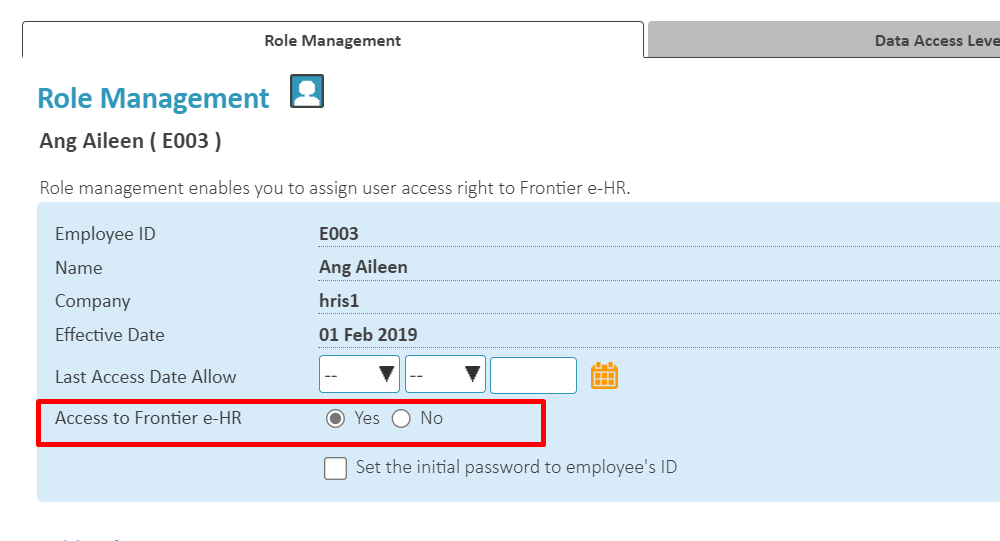
Access to Frontier Ehr is set to 'No'
Solution :
Go to Personnel > Processes > Access Rights, select the employee and set the 'Access to Frontier Ehr to 'Yes'.
Related Articles
Can employee access Frontier eHR after Termination record has been updated?
Employee will be able to access both Frontier eHR and mobile as long as it is before the termination date that has been updated in Termination record and <Access to Frontier e-HR> is set as 'Yes' in Access Rights. E.g. Administrator entered the ...How to set the Data Security Level in Frontier eHR system?
There are two settings that need to be configured before the Data Access Level feature can be used. 1. Assign Data Access Level to Admin/Manager at Personnel > Processes > Access Right > Data Access Level tab. 2. Assign Data Security Level to normal ...Encounter 'Empty password detected, unable to proceed' when new employee trying to login system
Symptoms: Administrator created a new employee and grant access right to Frontier e-HR system. However, when the new employee try to login (click on “Submit” button), the above error is encountered. Possible cause(s) Administrator did not set the ...How to control the access of employee remuneration data viewing for Personnel Administrator?
1. Go to Personnel-->Remuneration Setting 2. Next, select the name of the Personnel Administrator 3. Click on <Assign> 4. Select Job category and salary grade that the personnel administrator can access and click <Save>. 5. Once the setting is ...How to reset the password for a few employees in a single process and not affecting their access right?
Symptoms: To mass reset the account password for more than one employee and not affecting their existing system access right. Possible cause (s): None Suggested workaround/ solution(s): Go to All Menus > Personnel > Processes > Access Right > Mass ...